
vue的一个图片放大插件

众所周知,在开发电商网站或者某些商品网站时,商品详情页现在基本上都有一种稍微炫酷一点的图片放大镜效果。
正好手上某个小项目需要用到,于是搜罗了一发,搜索到了vue-piczoom这个插件,十分好用,截止此文发布为止,只有一个小问题就是canvas的位置默认是添加到body的最后面的,于是如果你的插件位置放在中间或者其他位置,就会出现放大镜框错位的情况
先说一下使用方法,根据github的提示,首先安装
npm install vue-piczoom --save
然后就可以直接引入并使用了
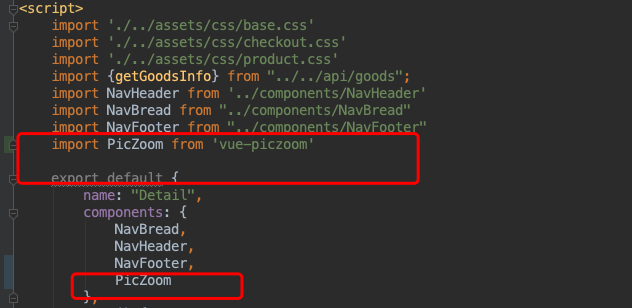

需要至少传入一个url参数,如图,传入的是图片路径,
scroll参数表示是否允许放大的时候进行滑动页面
scale参数表示放大的倍数
这样就已经使用成功了,但是会有一点小问题,如图
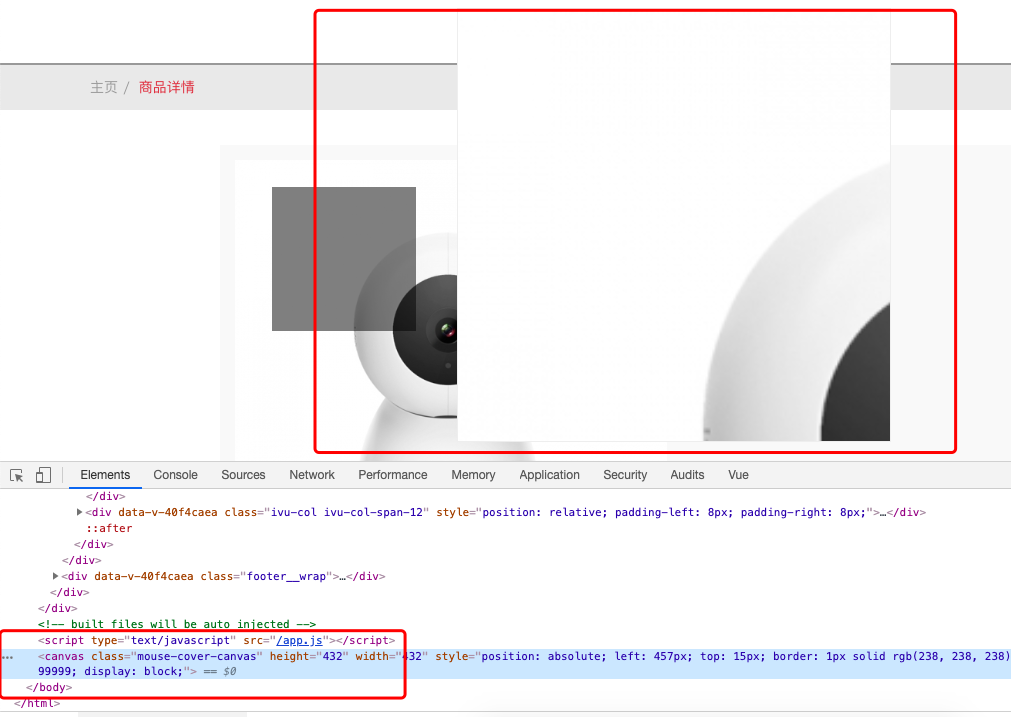
放大镜的位置把商品原图给覆盖掉了,因为canvas是添加到了body最后面,同时是absolute定位,而商品图片显示位置是离body有一定距离的,所以就出现了这个问题。那么就该解决了,方法很粗暴,直接看源码,因为源码也不多,废话不多说,跳到vue-piczoom源码第132行
this.canvas=document.createElement('canvas')
this.canvas.className='mouse-cover-canvas'
this.canvas.style.position='absolute'
this.canvas.style.left=this.imgbox.offsetLeft+this.imgbox.offsetWidth+10+'px'
this.canvas.style.top=this.imgbox.offsetTop+'px'
this.canvas.style.border='1px solid #eee'
this.canvas.style.zIndex='99999'
this.canvas.height=this.imgbox.offsetHeight
this.canvas.width=this.imgbox.offsetWidth
this.canvas.style.display='none'
document.body.append(this.canvas)
源码如是写到,可以看到最后一句就是
document.body.append(this.canvas)
所以改这里就行了
改成
this.canvas.style.display='none'
// document.body.append(this.canvas)
document.getElementById("img_container").append(this.canvas)
img_container是我包裹vue-piczoom组件的id值
问题解决。